Why Do My AirPods Keep Pausing? How to Stop It

By Suraj Giri, Founder & Publisher. Reviewed by Suraj Giri on .
Published · 6 min read
How this page was made
- Sources. Checked against 12 official pages from Apple, most recently on . See the sources.
- No device testing. We don't test fixes on physical devices, so nothing on this page is a hands-on result. A fact counts as verified only when it matches an official source page.
- AI use. As with every page on Gadget247News, AI tools helped research, outline, draft and edit this page, and re-read the official pages to flag facts that didn't match. The illustration at the top was generated with Runway and is labelled under the image.
- Human sign-off. Suraj Giri, Founder & Publisher, read this page and signed it off on . The site won't publish a page without that sign-off.
- Changes. The published and updated dates move only when the content changes, and every change gets a dated note. Spot an error or a fix that didn't work? Email info@gadget247news.com.
Read our AI use policy, editorial policy and corrections policy.
Your AirPods probably aren't broken: a feature is pausing them at the wrong moment. Ear detection, Conversation Awareness, Pause Media While Falling Asleep and stem presses all pause playback on purpose, and Automatic Switching moves your AirPods to another device. The fixes below go through them one at a time. For other AirPods problems, see AirPods pairing and battery fixes; for other sound problems on any brand, see headphones sound muffled.
Why AirPods Keep Pausing
Five AirPods features can stop your music or podcasts on purpose. The table lists them from the most likely to the least, with the models that have each one:
| Feature | What it does | Models | Where to turn it off |
|---|---|---|---|
| Automatic Ear Detection | Pauses when you take one AirPod out, resumes when you put it back; removing both stops playback | AirPods 1 to 5, all AirPods Pro (AirPods Max: Automatic Head Detection) | Settings → your AirPods (Audio & Routing) |
| Conversation Awareness | Lowers the volume when you speak and pauses spoken media, like a podcast, after a few seconds | AirPods 4 (ANC), AirPods 5, AirPods Pro 2 and 3, AirPods Max 2 | Control Center or Settings → your AirPods |
| Pause Media While Falling Asleep | Pauses audio when you fall asleep | AirPods 4 or later, AirPods Pro 2 or later, AirPods Max 2 | Settings → your AirPods (Audio & Routing) |
| Automatic Switching | Moves your AirPods to another Apple device signed in with the same Apple Account | AirPods 2, 3 and 4, all AirPods Pro, all AirPods Max | Settings → Bluetooth → ⓘ → Connect to This iPhone |
| Stem or Digital Crown press | One press pauses playback | AirPods 3, 4 and 5 and all AirPods Pro (stem); AirPods Max (Digital Crown) | No off switch on Apple's pages |
If ear detection pauses audio while both AirPods are still in your ears, clean them and then reset them (Fix 6). Automatic Switching has its own explainer: What Is AirPods Automatic Switching? How to Turn It Off.
How to Stop AirPods From Pausing
Turn these features off in the table's order, and stop when the pausing stops.
Fix 1: Turn Off Automatic Ear Detection
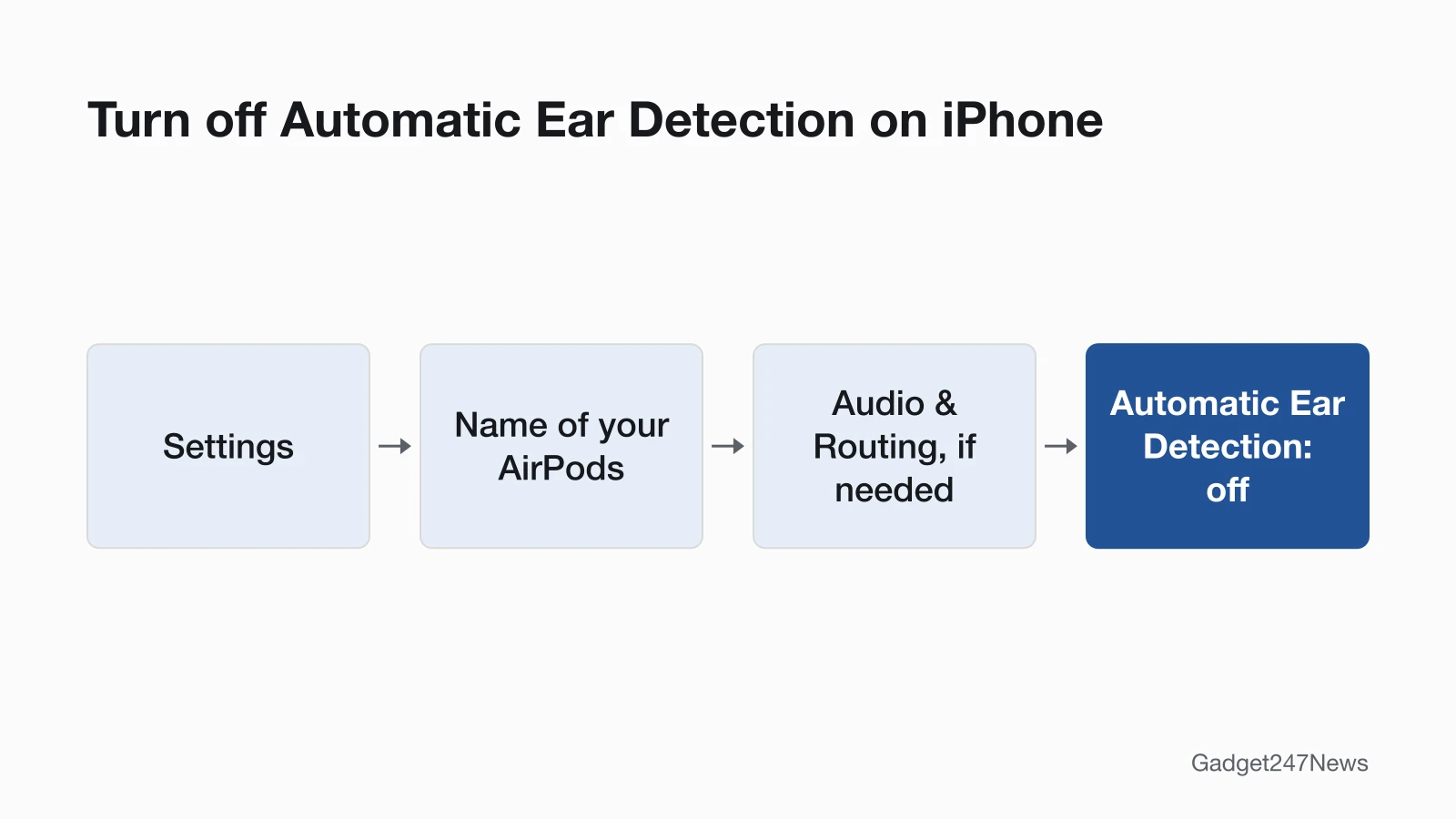
Turn off Automatic Ear Detection to stop AirPods pausing each time one leaves your ear:
- Wear your AirPods and make sure they're connected to your device.
- Open Settings and tap the name of your AirPods near the top of the screen. If you don't see the setting, tap Audio & Routing.
- Turn off Automatic Ear Detection.
On a Mac, choose Apple menu → System Settings, then click the name of your AirPods. The trade-off: with the setting on, audio moves to your device's speakers when you're not wearing the AirPods; with it off, all audio plays to your AirPods whether or not you're wearing them. AirPods Max use Automatic Head Detection in the same place instead; they pause when you take them off or lift one earphone off your head.
Fix 2: Turn Off Conversation Awareness
If a podcast pauses a few seconds after you start talking, turn off Conversation Awareness:
- While wearing your AirPods, open Control Center, touch and hold the volume control, then tap Conversation Awareness.
- Or open Settings, tap the name of your AirPods, then turn off Conversation Awareness (tap Audio & Routing first if you don't see it).
Only AirPods 4 (ANC), AirPods 5, AirPods Pro 2, AirPods Pro 3 and AirPods Max 2 have it, so owners of AirPods 3 or earlier can skip this fix. On stem models, press and hold the stem to end one conversation without turning the feature off. Conversation Awareness also lowers music while you talk, which is covered under AirPods volume too low.
Fix 3: Turn Off Pause Media While Falling Asleep
If audio stops as you doze off, turn off Pause Media While Falling Asleep:
- Wear your AirPods, open Settings and tap the name of your AirPods.
- Turn off Pause Media While Falling Asleep (tap Audio & Routing first if you don't see it).
Apple lists it for AirPods 4 or later and AirPods Pro 2 or later; the AirPods User Guide adds AirPods Max 2 and calls the setting Pause Media When Falling Asleep.
Fix 4: Stop Automatic Switching to Your Other Devices
If music stops when you pick up your iPad or Mac, set Connect to This iPhone to When Last Connected to This iPhone:
- With your AirPods in your ears, open Settings and tap Bluetooth.
- Tap the More Info button (ⓘ) next to your AirPods.
- Tap Connect to This iPhone.
- Tap When Last Connected to This iPhone. To undo it later, tap Automatically.
Apple's own example is AirPods jumping from music on your Mac to a podcast on your iPhone. On a Mac, go to System Settings → Bluetooth, click Options next to your AirPods, then choose When Last Connected to This Mac from the Connect to This Mac menu. Apple says sound shouldn't switch automatically during a phone call, FaceTime call or video conference.
Fix 5: Check for Accidental Presses
One press on the stem pauses audio on AirPods 3, 4 and 5 and all AirPods Pro, and one press of the Digital Crown pauses AirPods Max. That includes a press you make by accident, for example while adjusting the fit. Apple's settings pages give no switch for the single press; for double presses and press-and-hold actions, Settings → Accessibility → AirPods sets Press Speed and Press and Hold Duration. The full list of AirPods controls shows what each press does.
Fix 6: Clean Your AirPods, Then Reset
Clean your AirPods with Apple's steps for your model, then reset them as the last step. Apple uses ear detection as a reset test: in its noise cancelling steps, AirPods that don't pause when you remove one should be reset. A reset also resets your custom settings, so check Automatic Ear Detection and the settings above again afterwards. Follow the steps to reset AirPods for your model. AirPods Max owners can also clean AirPods Max ear cushions. AirPods Pro take the same fixes; their extra features are in the table.

Still not working?
If the pausing continues after every fix, work through these steps:
- Try the next fix: if the sound drops out rather than pauses, see AirPods keep cutting out.
- Reset your AirPods: How to Reset AirPods (you'll need to pair them again afterwards).
- Contact Apple Support: support.apple.com/airpods.
- Check AirPods repair options.
Started after an update? Check the Update Tracker for known issues.
Pausing or Disconnecting?
A pause leaves your AirPods connected: press play or put the AirPod back, and the audio carries on. If the AirPods lose their connection to your device instead, that's a disconnect, and the cutting-out fixes above apply rather than these settings.
Related AirPods Problems
Low volume and weak noise cancelling have their own fixes. Why Are My AirPods So Quiet covers volume limits and Balance, and AirPods Noise Cancelling Not Working covers the listening mode and fit.
AirPods Pausing: Quick Answers
How do I pause AirPods on purpose?
Press the stem once on AirPods 3, 4 and 5 or AirPods Pro, and press it again to resume. On AirPods Max, press the Digital Crown. On AirPods 1 and 2, take one AirPod out, or set a double-tap to pause in your AirPods settings.
Why are my AirPods not noise cancelling anymore?
A changed listening mode is the first thing to rule out: Apple's steps want Noise Cancellation on and Adaptive Audio off, followed by the fit test. The full order is on AirPods Noise Cancelling Not Working.
How can I fix my AirPods if only one works?
Let both AirPods charge in the case for 30 seconds, then play audio to test the one that isn't working. Apple's full order, including the Balance slider, is on the page for sound from only one AirPod.
Sources
We checked this page against the pages below, most recently on . How we verify fixes
- Change the settings of your AirPods and AirPods Pro (Apple, support.apple.com)Official
- Adjust listening mode settings on AirPods (AirPods User Guide) (Apple, support.apple.com)Official
- Play audio on AirPods, AirPods Pro, or AirPods Max (AirPods User Guide) (Apple, support.apple.com)Official
- Change settings for AirPods or AirPods Pro (AirPods User Guide) (Apple, support.apple.com)Official
- Change settings for AirPods Max (AirPods User Guide) (Apple, support.apple.com)Official
- Switch your AirPods to another device (Apple, support.apple.com)Official
- Change force sensor or button settings for AirPods (AirPods User Guide) (Apple, support.apple.com)Official
- Connect and use your AirPods Max (Apple, support.apple.com)Official
- If Active Noise Cancellation isn't working as expected on your AirPods (Apple, support.apple.com)Official
- How to clean your AirPods (Apple, support.apple.com)Official
- If your AirPods won't charge (Apple, support.apple.com)Official
- If your left or right AirPod isn't working (Apple, support.apple.com)Official