Galaxy Buds Battery Draining Fast? Causes and Fixes

By Suraj Giri, Founder & Publisher. Reviewed by Suraj Giri on .
Published · 7 min read
How this page was made
- Sources. Checked against 12 official pages from Samsung, most recently on . See the sources.
- No device testing. We don't test fixes on physical devices, so nothing on this page is a hands-on result. A fact counts as verified only when it matches an official source page.
- AI use. As with every page on Gadget247News, AI tools helped research, outline, draft and edit this page, and re-read the official pages to flag facts that didn't match. The illustration at the top was generated with Runway and is labelled under the image.
- Human sign-off. Suraj Giri, Founder & Publisher, read this page and signed it off on . The site won't publish a page without that sign-off.
- Changes. The published and updated dates move only when the content changes, and every change gets a dated note. Spot an error or a fix that didn't work? Email info@gadget247news.com.
Read our AI use policy, editorial policy and corrections policy.
Samsung rates the Galaxy Buds3 Pro at up to 7 hours of music on the earbuds and up to 30 hours in total with the case when ANC is off, or up to 6 and 26 hours with ANC on. Those figures come from Samsung's internal testing, and Samsung says actual battery life depends on "usage conditions, settings, number of times charged, Bluetooth signal strength, and other factors." If your Samsung Galaxy Buds run down well short of that, work through the fixes below in order. Buds that won't charge at all have their own page, linked at the end. For any other Galaxy Buds problem, start from our Galaxy Buds fixes.
For other brands, our cross-brand guide shows how to get your earbuds charging again.
Why Is My Galaxy Buds Battery Draining So Fast?
Fast Galaxy Buds battery drain traces back to five things Samsung's support pages cover:
- Buds left out of the charged case between uses, which is the first thing Samsung's battery tips address.
- Notifications read aloud on the buds, which Samsung's second battery tip tells you to adjust.
- Old earbud software, since Samsung says updates "improve performance and stability."
- A case that charges slowly or not at all, for example from a computer (slower, Samsung says) or off-center on a wireless pad.
- Heavier use and settings: Samsung's Buds3 Pro spec lists up to 6 hours on the earbuds with ANC on, against up to 7 hours with it off.
How to Fix Galaxy Buds That Drain Fast
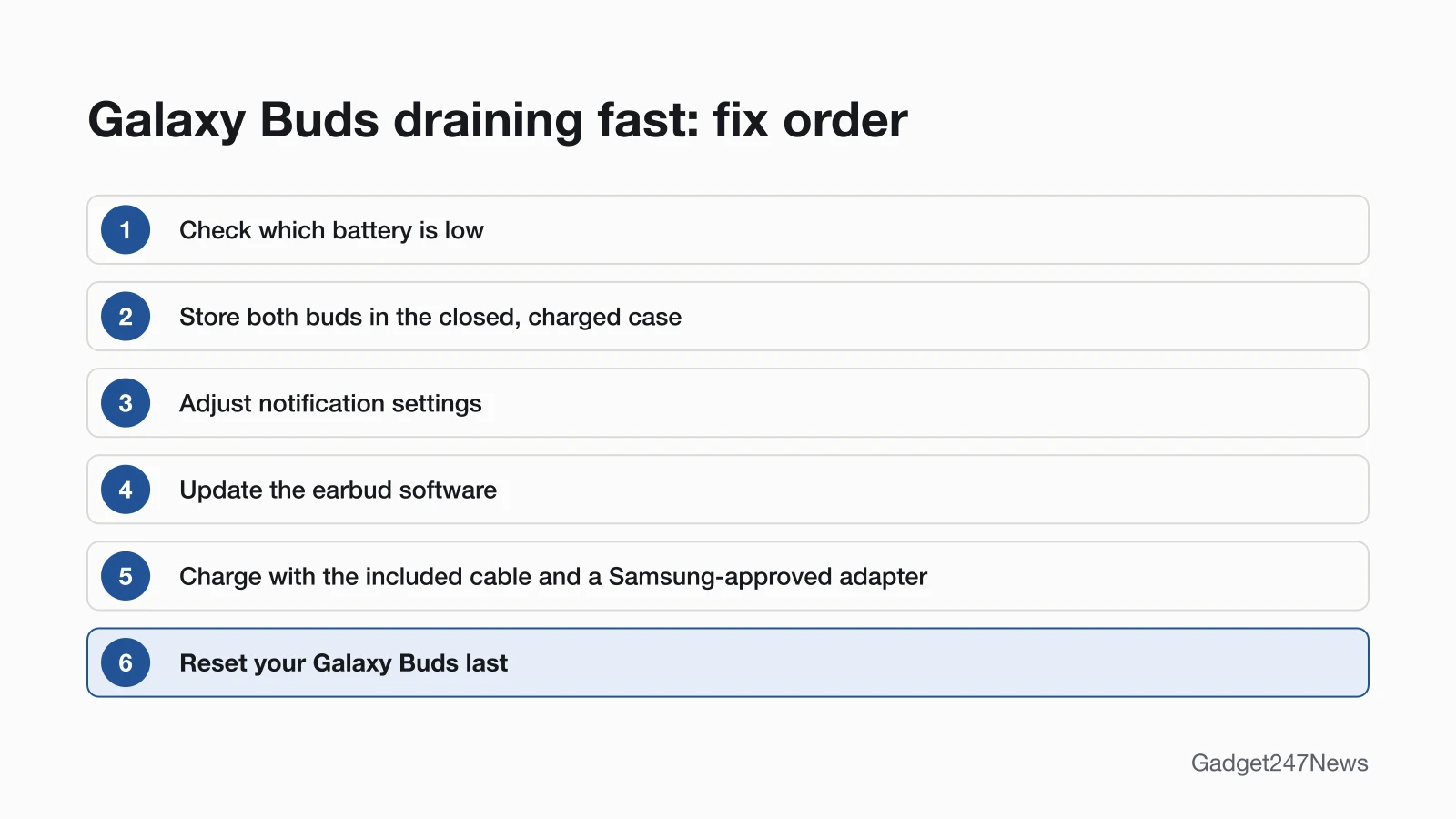
These follow Samsung's battery tips first; reset comes last. Where a fix uses a menu, we give both the One UI 8 Settings route and the Galaxy Wearable app route.
Fix 1: Check Which Battery Is Low
Check the battery level first, so you know whether the earbuds or the case is running down:
- On an Android phone, open the Galaxy Wearable app. Samsung says it "displays the buds' current battery percentage at the top of the Home tab," and newer models show the case's battery there too.
- On Galaxy Buds3 or Buds3 Pro, close the case and watch its light for 5 seconds: green means 60% or higher, yellow 30% to 59%, red 10% to 29%, and flashing red below 10%.
If the case is the low one, charge it first; Fix 5 covers how Samsung says to do that.
Fix 2: Store Them in the Closed, Charged Case
Put both buds back in the case and close the lid whenever they're out of your ears. Samsung's first tip is to keep them "in the charged charging case with the cover closed" when you aren't using them, and the buds disconnect from your phone once they're back inside. Keep the case charged as well: as Samsung puts it, "the charging case also has its own charge."
Fix 3: Adjust Notification Settings
Turn off spoken notifications you don't need on the buds; this is Samsung's second battery tip:
- Open your earbud settings. On a One UI 8 phone, open Settings and tap your Galaxy Buds (they appear under your name). On One UI 7 and older, open the Galaxy Wearable app.
- On Galaxy Buds2, Buds2 Pro, Buds Pro, Buds+ and Buds Live, tap Earbud settings, then Read notifications aloud. On the original Galaxy Buds, Read notifications aloud is on the app's Home screen.
- Turn the switch off, or tap See all under the app list and switch off only the apps you don't need read aloud.
On an iPhone, Samsung says to use the Galaxy Buds app, which isn't compatible with the Galaxy Buds3, Buds3 Pro, Buds, Buds Pro, Buds2 or Buds2 Pro.
Fix 4: Update the Earbud Software
Update the buds next, because Samsung says new earbud software can "improve performance and stability":
- On One UI 8.0 or later, open Settings, tap your Galaxy Buds, then tap Earbuds software update and Download and install.
- On One UI 7.0 or earlier, open the Wearable app and tap the same two options.
The buds disconnect during the update and reconnect by themselves when it's complete. The PC and iPhone routes are on our page to update Samsung Galaxy Buds firmware.
Fix 5: Charge Them the Way Samsung Says
Charge the case with the included USB cable and a Samsung-approved wall adapter, or on a select Samsung Qi-compatible wireless pad. On a pad, Samsung says to place the case "directly on the center of the charging pad," and a cover on the case "may interfere with wireless charging," so take it off or use the cable. Charging from a computer "may result in a slower charging speed." Warmth while charging is expected: Samsung calls it normal and says it "should not affect the earbuds' lifespan or performance."
Fix 6 (Last): Reset Your Galaxy Buds
Reset the buds only after the five fixes above. Samsung says a reset restores their default settings and "can help resolve connection or performance issues." The full steps are in How to Reset Galaxy Buds.
Galaxy Buds Battery Life by Model
Samsung rates each model's play time on the earbuds alone and with a fully charged case; the figures below are in Samsung's own terms.
| Model | Earbuds | With a fully charged case | Source |
|---|---|---|---|
| Galaxy Buds4 Pro | Up to 6 hours (ANC on), up to 7 hours (ANC off) | Up to 26 hours (ANC on), up to 30 hours (ANC off) | Samsung US newsroom |
| Galaxy Buds4 | Up to 5 hours (ANC on), up to 6 hours (ANC off) | Up to 24 hours (ANC on), up to 30 hours (ANC off) | Samsung US newsroom |
| Galaxy Buds3 FE | Up to 6.0 hours (ANC on), up to 8.5 hours (ANC off) | Up to 24 hours (ANC on), up to 30 hours (ANC off) | Samsung US compare table |
| Galaxy Buds3 Pro | Up to 6 hours (ANC on), up to 7 hours (ANC off) | Up to 26 hours (ANC on), up to 30 hours (ANC off) | Samsung spec sheet (Gulf) |
| Galaxy Buds3 | Up to 5 hours (ANC on), up to 6 hours (ANC off) | Up to 24 hours (ANC on), up to 30 hours (ANC off) | Samsung spec sheet (Canada) |
| Galaxy Buds2 Pro | Up to 8 hours | Up to 30 hours | Samsung US battery page |
| Galaxy Buds FE | Up to 7 hours | Up to 26 hours | Samsung US battery page |
| Galaxy Buds2 | Up to 7.5 hours | Up to 29 hours more | Samsung US battery page |
| Galaxy Buds Pro | Up to 8 hours | Up to 28 hours more | Samsung US battery page |
| Galaxy Buds Live | Up to 8 hours | Up to 29 hours more | Samsung US battery page |
| Galaxy Buds+ | Up to 11 hours | Up to 11 hours more | Samsung US battery page |
| Galaxy Buds | Up to 6 hours | Up to 7 hours more | Samsung US battery page |
Where Samsung writes "more," the case figure comes on top of the earbuds' own hours; the other rows are totals. Samsung's compare table writes the Buds3 FE as "Up to 8.5/30hr (ANC Off)"; we read that as earbuds and total, the way Samsung's newsroom spells out the Buds4 Pro's matching 7.0/30 figure.
One Galaxy Bud Dies Faster
Check that the bud that drains first sits fully in its slot, because Samsung says the charging contacts won't connect if a bud isn't in its correct spot. Clean the contacts too: "dust, wax, or other debris can build up on the charging contacts and prevent charging." Samsung also notes "the battery life will differ if they are charged separately." If one bud still drains faster, re-sync the pair with the steps on our page One Galaxy Bud not working, then contact Samsung.

Still not working?
If the battery still runs down fast after all six fixes, work through these in order:
- Try the next fix: Galaxy Buds not charging (if they won't charge at all).
- Reset your Samsung Galaxy Buds: How to reset Galaxy Buds (you'll need to pair them again afterwards).
- Contact Samsung Support: Samsung Support (external).
- Check repair or warranty options: Samsung repair service (external).
Started after an update? Check the Update Tracker for known issues.
Draining Faster Since an Update?
If the drain started right after new earbud or phone software, check our list of the latest Galaxy Buds firmware for a known issue before you reset anything. On the case itself, Samsung's battery page lists a blue light as "Firmware is updating."
Get an email when a Galaxy Buds update breaks something, and when it's fixed.
How Long Do Galaxy Buds Batteries Last?
Samsung doesn't publish a battery lifespan in years or charge cycles on the support pages we read. It does say heat while charging is normal, and that "if the battery heats up more than usual, the charger will stop charging." If the case or a bud still won't charge after troubleshooting, and the earbuds, charger and wall adapter aren't damaged, Samsung says "service is required."
Galaxy Buds Battery: Quick Answers
How long does the Galaxy Buds3 Pro battery last?
The Galaxy Buds3 Pro battery lasts up to 7 hours on the earbuds and 30 hours with the case with ANC off, according to Samsung's spec sheet. With ANC on, the figures drop to up to 6 hours and 26 hours. Samsung bases its play time on internal testing with a Galaxy phone on default settings.
How long does the Galaxy Buds FE battery last?
Samsung says the Galaxy Buds FE "provide up to 7 hours of play time per charge, which can be extended to up to 26 hours with a fully charged case." The Galaxy Buds3 FE is rated at up to 8.5 hours on the earbuds with ANC off in Samsung's compare table.
Sources
We checked this page against the pages below, most recently on . How we verify fixes
- The battery life of your Samsung earbuds (Samsung, samsung.com)Official
- Galaxy Buds3 Pro product page and specifications (Samsung Gulf) (Samsung, samsung.com)Official
- Galaxy Buds3 product page and specifications (Samsung Canada) (Samsung, samsung.com)Official
- Samsung Unveils Galaxy Buds4 Series (Samsung Newsroom U.S.) (Samsung, news.samsung.com)Official
- Explore Galaxy Buds4 Pro (Samsung US) (Samsung, samsung.com)Official
- Getting started with your Galaxy Buds3 and Galaxy Buds3 Pro (Samsung, samsung.com)Official
- How to connect or disconnect Galaxy Buds to a mobile? (Samsung, samsung.com)Official
- Galaxy earbuds do not play notifications (Samsung, samsung.com)Official
- How to update your Samsung Galaxy Buds software (Samsung, samsung.com)Official
- Samsung earbuds do not turn on or charge (Samsung, samsung.com)Official
- How to reset your Samsung Galaxy Buds (Samsung, samsung.com)Official
- How to restart or reset your Samsung earbuds (Samsung, samsung.com)Official