Do AirPods Work with Android?

By Suraj Giri, Founder & Publisher. Reviewed by Suraj Giri on .
Published · 5 min read
How this page was made
- Sources. Checked against 9 official pages from Apple and Google, most recently on . See the sources.
- No device testing. We don't test fixes on physical devices, so nothing on this page is a hands-on result. A fact counts as verified only when it matches an official source page.
- AI use. As with every page on Gadget247News, AI tools helped research, outline, draft and edit this page, and re-read the official pages to flag facts that didn't match. The illustration at the top was generated with Runway and is labelled under the image.
- Human sign-off. Suraj Giri, Founder & Publisher, read this page and signed it off on . The site won't publish a page without that sign-off.
- Changes. The published and updated dates move only when the content changes, and every change gets a dated note. Spot an error or a fix that didn't work? Email info@gadget247news.com.
Read our AI use policy, editorial policy and corrections policy.
Yes. AirPods work with Android phones as a Bluetooth headset: you can listen and talk, but you can't use Siri. Features that rely on an Apple Account, such as automatic switching, only work between Apple devices.
Apple's own AirPods guide has a page for this: "You can use AirPods as a Bluetooth® headset with a non-Apple device." On an Android phone they pair and connect like any other Bluetooth headphones, so the difference between pairing and connecting Bluetooth headphones applies to them too: you pair once, then they reconnect from the saved list. The limits are Apple features that Apple documents only for its own devices.
For step-by-step pairing on Samsung, Pixel and other Android phones, plus fixes when it fails, use How to Connect AirPods to Android. This page answers what works once they're paired.
What Works and What Doesn't on Android
The table compares AirPods on an iPhone and on an Android phone, feature by feature. "Not listed" means Apple's support page for that feature names only Apple devices; Apple doesn't say it fails on Android, and it doesn't document Android use either.
| Feature | On iPhone | On Android | Source |
|---|---|---|---|
| Listening and calls | Yes | Yes | Apple: non-Apple device guide |
| Siri | Yes | No: "You can't use Siri" | Apple: non-Apple device guide |
| Automatic switching | Yes, between Apple devices on the same Apple Account | Not listed | Apple: Switch your AirPods |
| Live Translation | iPhone 15 Pro or later with iOS 26 or later and Apple Intelligence turned on | Not listed | Apple: Live Translation |
| Hearing Aid (AirPods Pro 2 and 3) | iPhone or iPad with iOS 18 or iPadOS 18 and later; also a Mac with macOS Sequoia or later | Not listed | Apple: feature availability |
| Personalized Spatial Audio setup | iPhone with iOS 16 or later and the TrueDepth camera | Not listed | Apple: Personalized Spatial Audio |
| Battery level on the phone | Settings, then Bluetooth, then your AirPods | Not documented; the case light still works | Apple: Charge your AirPods |
| Firmware updates | Automatic while charging, near an iPhone, iPad or Mac on Wi-Fi | Not listed | Apple: firmware updates |
Sound and calls are the parts Apple confirms for Android. Everything else in the table is an Apple-device feature on Apple's own pages.
Automatic switching is the clearest example. Apple says AirPods 2, 3 and 4, all AirPods Pro and all AirPods Max "can switch automatically between your iPhone, iPad, Mac, Apple Watch, and Apple Vision Pro," when each device is signed in to the same Apple Account with two-factor authentication. An Android phone isn't on that list, so you move AirPods to it by selecting them in its Bluetooth settings.
Which AirPods Work With Android?
Every AirPods model pairs with Android. Apple's page for non-Apple devices gives pairing steps for AirPods 1, 2 and 3, AirPods Pro 1 and 2, AirPods 4 and 5, AirPods Pro 3 and AirPods Max. Only the pairing-mode control changes by model: a setup button on the older cases, a double-tap on the front of the newer ones, and the listening mode button on AirPods Max.
How to Pair AirPods With an Android Phone
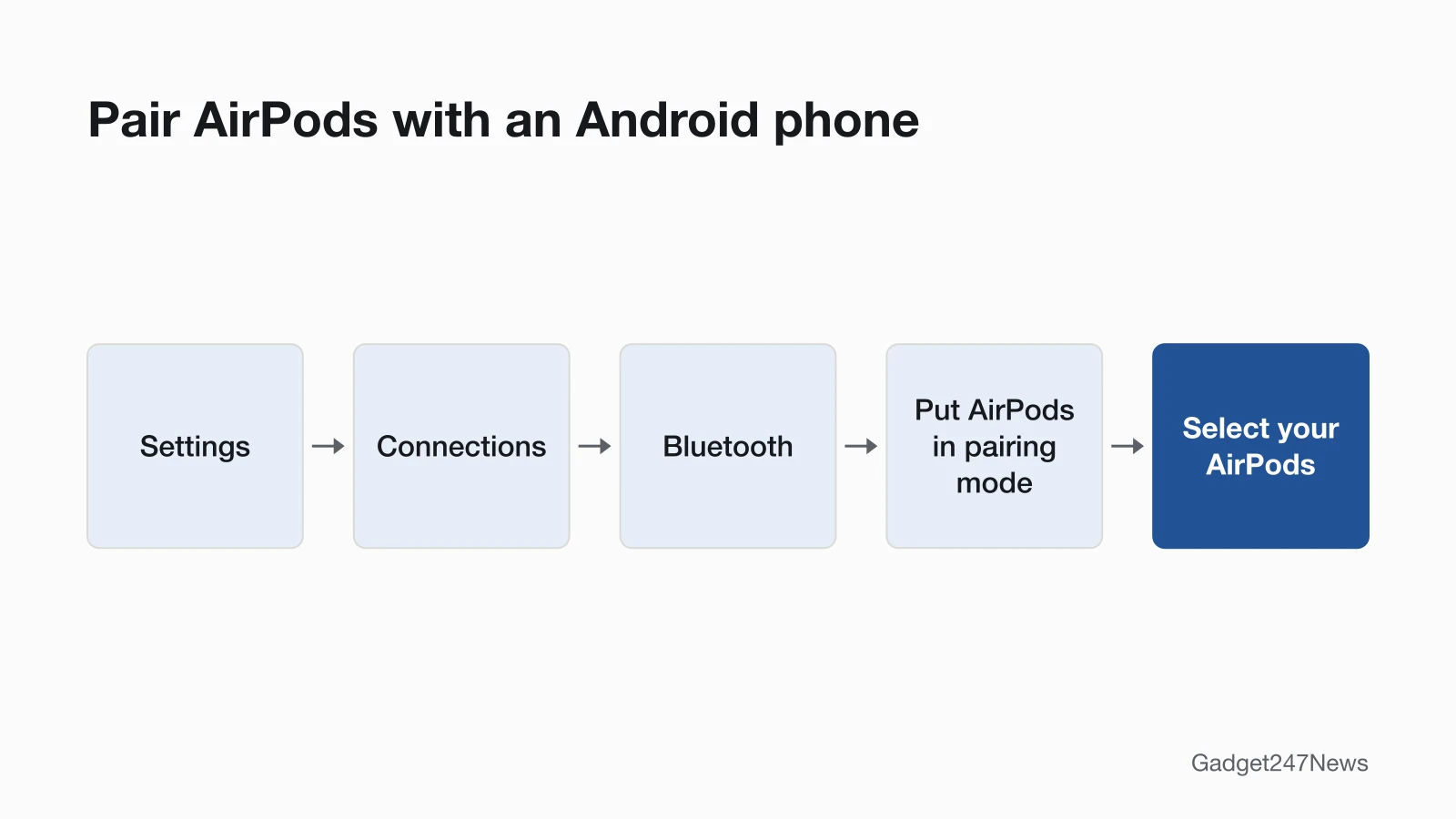
Apple's steps for an Android phone take three moves:
- Turn on Bluetooth. On Android, Apple's guide says to "go to Settings, tap Connections, then tap Bluetooth."
- Put the AirPods in pairing mode. With the AirPods in the case and the lid open, hold the setup button on the back of the case for about 5 seconds (AirPods 1 to 3, AirPods Pro 1 and 2), double-tap the front of the open case (AirPods 4 and 5, AirPods Pro 3), or hold the listening mode button for about 5 seconds (AirPods Max), until the status light flashes white.
- Select the AirPods when they appear in the list of Bluetooth devices.
After that first pairing, Google says Android devices "can connect automatically." Model-specific steps and fixes are in the Android connection guide linked above.
Can You See AirPods Battery on Android?
Apple's battery page doesn't give a way to see AirPods battery on an Android phone. It lists checks "with your iPhone, iPad, or Mac, or on your charging case." The charging case is the check that doesn't need an Apple device: look at its status light. Apple says "Green means fully charged, and amber means that less than one full charge remains."
Do the AirPods Controls Work on Android?
Apple's page for non-Apple devices doesn't say which controls work on Android. It confirms only that you "can listen and talk" and doesn't list any press, tap or swipe controls. What each press, tap and swipe does is covered in our guide to AirPods controls.
Can You Update AirPods Firmware From Android?
No Android method is documented. Apple's update page says "Firmware updates are delivered automatically while your AirPods are charging and in Bluetooth range of your iPhone, iPad, or Mac that's connected to Wi-Fi." That page lists only iPhone, iPad and Mac as update devices and doesn't describe any way to update AirPods from Android. If you can borrow one of those devices, Apple's steps are to connect the AirPods to it over Bluetooth, put it on Wi-Fi, connect the charging case to power, close the AirPods in the case within Bluetooth range, then "Wait at least 30 minutes for the firmware to update."
If AirPods Won't Work With Your Android Phone
When AirPods won't pair or connect to an Android phone, the checks are the same as for other earbuds, plus one more if you also use them with an iPhone or iPad.
Why Won't My AirPods Connect to Android?
Check three things: pairing mode, an iPhone or iPad they're still paired with, and the Android phone's saved list. Put them back in pairing mode first. If they pair with an iPhone or iPad but not your Android phone, Apple's advice for that case is to "Unpair the accessory from your other devices." If they never appear in the list, the guide to earbuds not showing up in Bluetooth covers every cause. If they're saved, touch and hold Bluetooth and select them under "Saved devices". The Android connection guide has the AirPods fixes in order.
What About an Apple Watch?
An Apple Watch doesn't work the same way. Apple's setup page says "To set up Apple Watch Series 12 and Apple Watch Ultra 4, you need an iPhone 11 or later with iOS 27 or later," and Apple Watch SE 3 also needs an iPhone 11 or later. The full answer to can You Use an Apple Watch with Android explains the options.
AirPods and Android: Quick Answers
Do AirPods work with Samsung phones? Yes. Galaxy phones run Android, so everything above applies. The Bluetooth path Apple gives for Android is Settings, then Connections, then Bluetooth.
Do AirPods sound worse on Android? None of the Apple pages we read compares AirPods sound on iPhone and Android. Apple's page for non-Apple devices promises listening and calls, nothing more specific. How Bluetooth audio formats differ between phones is covered in Bluetooth Codecs Explained: AAC, aptX and LDAC.
Sources
We checked this page against the pages below, most recently on . How we verify fixes
- Apple AirPods User Guide: Pair AirPods with a non-Apple device (Apple, support.apple.com)Official
- Apple: Switch your AirPods to another device (Apple, support.apple.com)Official
- Apple: Use Live Translation with your AirPods (Apple, support.apple.com)Official
- Apple: AirPods Pro 3 Hearing Health feature availability (Apple, apple.com)Official
- Apple: Listen with Personalized Spatial Audio for AirPods and Beats (Apple, support.apple.com)Official
- Apple: Charge your AirPods (Apple, support.apple.com)Official
- Apple: About firmware updates for AirPods (Apple, support.apple.com)Official
- Apple: Set up your Apple Watch (Apple, support.apple.com)Official
- Google: Find & set up Bluetooth devices near your Android device (Google, support.google.com)Official