How to Update Apple Watch

By Suraj Giri, Founder & Publisher. Reviewed by Suraj Giri on .
Published · 4 min read
How this page was made
- Sources. Checked against 7 official pages from Apple, most recently on . See the sources.
- No device testing. We don't test fixes on physical devices, so nothing on this page is a hands-on result. A fact counts as verified only when it matches an official source page.
- AI use. As with every page on Gadget247News, AI tools helped research, outline, draft and edit this page, and re-read the official pages to flag facts that didn't match. The illustration at the top was generated with Runway and is labelled under the image.
- Human sign-off. Suraj Giri, Founder & Publisher, read this page and signed it off on . The site won't publish a page without that sign-off.
- Changes. The published and updated dates move only when the content changes, and every change gets a dated note. Spot an error or a fix that didn't work? Email info@gadget247news.com.
Read our AI use policy, editorial policy and corrections policy.
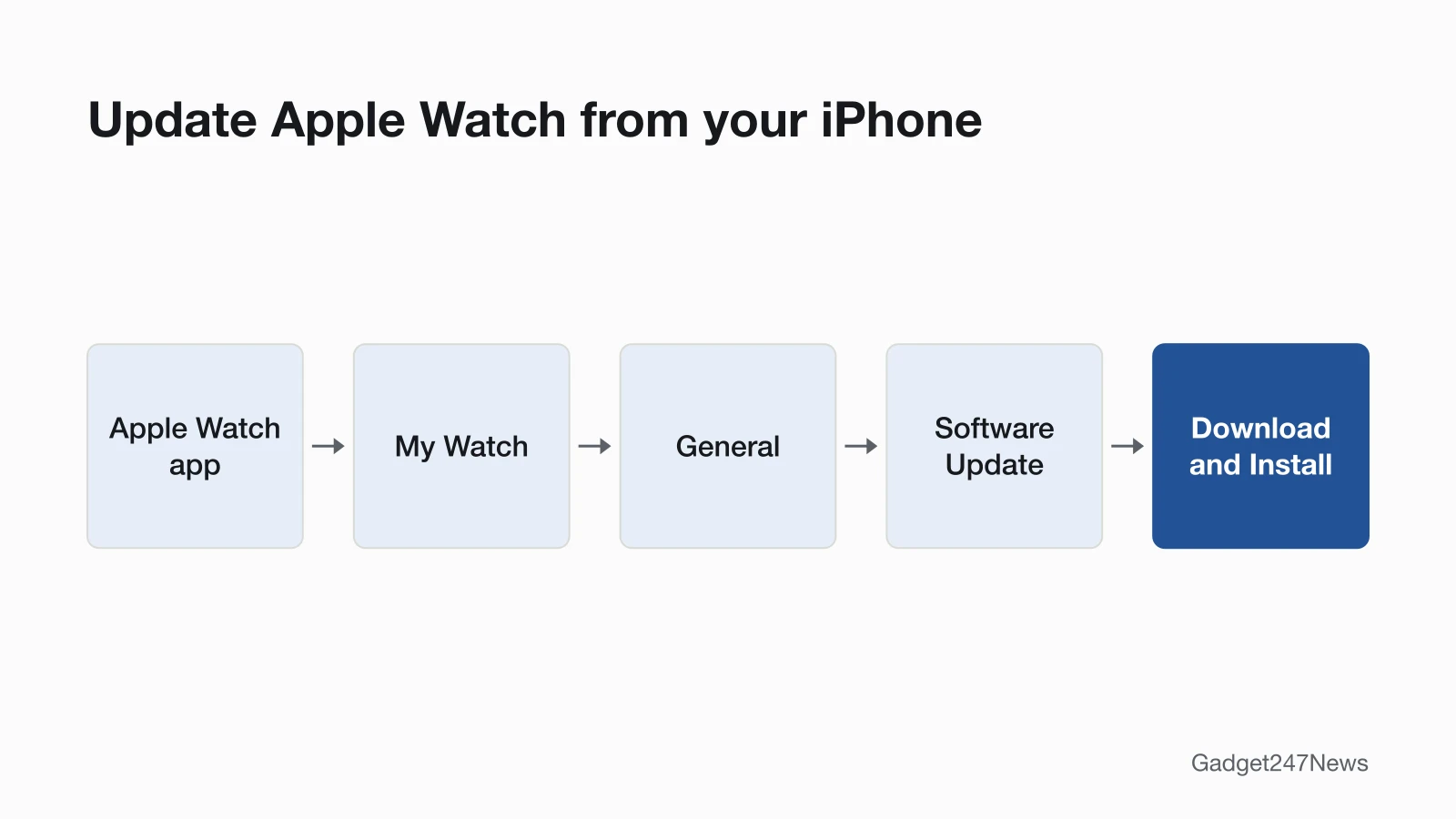
To update an Apple Watch, open the Apple Watch app on your iPhone, tap My Watch, then General, then Software Update, and download the update with the watch on its charger. You can also install it on the watch over Wi-Fi. For other faults, start from Apple Watch pairing, sync and battery fixes; what each release changed is on the wearable and earbud Update Tracker.
How to Update Apple Watch From Your iPhone
Update your Apple Watch from its paired iPhone in five steps, starting in the Apple Watch app:
- On your iPhone, open the Apple Watch app and tap the My Watch tab.
- Tap General, then tap Software Update.
- Tap Download and Install. If you're asked for your iPhone passcode or Apple Watch passcode, enter it.
- Wait for the progress wheel to appear on your Apple Watch.
- Leave the watch on its charger until the update completes. Don't restart your iPhone or Apple Watch, and don't quit the Apple Watch app.
The watch restarts on its own when the update is done. Some iOS updates also need a newer watchOS: an iPhone alert that says "Your Apple Watch software is out of date" means it's time to update the watch, so your data, including Activity data, keeps syncing to your iPhone.
How to Update Apple Watch Without Your iPhone
To update Apple Watch without your iPhone, install the software update on the watch itself over Wi-Fi:
- Connect your Apple Watch to Wi-Fi.
- Open the Settings app on the watch.
- Tap General, then tap Software Update.
- Tap Install if a software update is available, then follow the onscreen instructions.
Keep the watch on its charger while the update completes, and don't restart it.
Can Your Apple Watch Get the Latest watchOS?
watchOS 27 installs on Apple Watch SE 3, Series 9 and later, and Ultra 2 and later; on any other model, Software Update shows the newest version that watch can use instead. If you're not sure which watch you wear, identify your Apple Watch model first.
How to Check Your watchOS Version
Your watchOS version is on the About screen, which you can open on the watch or in the Apple Watch app; Apple lists the software version among the items shown there.
On your Apple Watch:
- Open the Settings app.
- Tap General, then tap About.
- Find the software version in the list.
On your iPhone:
- Open the Apple Watch app.
- Tap My Watch, then tap General.
- Tap About.
Compare the number you see with the current release on watchOS versions and known issues on Apple Watch.
Automatic Updates
Apple's hands-off route is the update notification: when your Apple Watch notifies you that a new update is available, tap Update Tonight, confirm on your iPhone, then leave both devices charging overnight. Apple's update article doesn't describe a separate automatic switch for watchOS. The watch's App Store Automatic Updates option covers apps: it will "automatically download new versions of your apps".
If Your Apple Watch Won't Update
An update that won't start, stalls, or shows "Cannot Install Update" or a message asking for more available storage needs the fixes on Apple Watch not updating. If the watch has lost its link to your iPhone, fix that first with Apple Watch won't connect to your phone. After a switch to a new iPhone, connect an Apple Watch to a new phone, then update from that iPhone.
Update Questions
Three short answers cover update time, the newest release and problems that start after updating.
Why does an Apple Watch update take so long?
Apple puts a watchOS update at several minutes to an hour, and suggests starting one overnight for that reason. If it stalls with the watch on its charger and the iPhone nearby on Wi-Fi, the Apple Watch Won't Update guide has the fixes.
What's the latest Apple Watch update?
watchOS 27 is the version Apple's update page names on September 26, 2026, for Apple Watch SE 3, Series 9 and later, and Ultra 2 and later. Apple's security releases list adds watchOS 27.0.1, released September 23, 2026, for Apple Watch Series 12 and Apple Watch Ultra 4 only. The watchOS versions page and the Update Tracker follow each new release.
Get an email when a watchOS update breaks something, and when it's fixed.
What if my Apple Watch isn't working after an update?
Check the known issues for your version on the watchOS versions page first, because a fault that starts the day an update installs can be a known bug. Shorter battery life right after updating has a documented cause: Apple says some update tasks keep running in the background, and advises you to wait a few days before you check again.
Sources
We checked this page against the pages below, most recently on . How we verify fixes
- Update your Apple Watch (Apple, support.apple.com)Official
- Update Apple Watch software (Apple Watch User Guide) (Apple, support.apple.com)Official
- Get information about Apple Watch (Apple Watch User Guide, watchOS 26 edition) (Apple, support.apple.com)Official
- Identify your Apple Watch (Apple, support.apple.com)Official
- Get apps in the App Store on Apple Watch (Apple Watch User Guide) (Apple, support.apple.com)Official
- Apple security releases (Apple, support.apple.com)Official
- If the battery in your Apple Watch drains too quickly (Apple, support.apple.com)Official