Why Galaxy Buds Keep Disconnecting

By Suraj Giri, Founder & Publisher. Reviewed by Suraj Giri on .
Published · 7 min read
How this page was made
- Sources. Checked against 19 official pages from Samsung and Microsoft, most recently on . See the sources.
- No device testing. We don't test fixes on physical devices, so nothing on this page is a hands-on result. A fact counts as verified only when it matches an official source page.
- AI use. As with every page on Gadget247News, AI tools helped research, outline, draft and edit this page, and re-read the official pages to flag facts that didn't match. The illustration at the top was generated with Runway and is labelled under the image.
- Human sign-off. Suraj Giri, Founder & Publisher, read this page and signed it off on . The site won't publish a page without that sign-off.
- Changes. The published and updated dates move only when the content changes, and every change gets a dated note. Spot an error or a fix that didn't work? Email info@gadget247news.com.
Read our AI use policy, editorial policy and corrections policy.
This page covers Samsung Galaxy Buds that connect, then drop out, cut out or jump to another device. Buds that never connect at all have their own guide, linked near the end. Every other fault starts from Galaxy Buds pairing, battery and sound fixes.
For AirPods, Pixel Buds, Bose and other makers, the cross-brand guide for when earbuds keep disconnecting lines up each cause with its first fix.

Why Do My Galaxy Buds Keep Disconnecting?
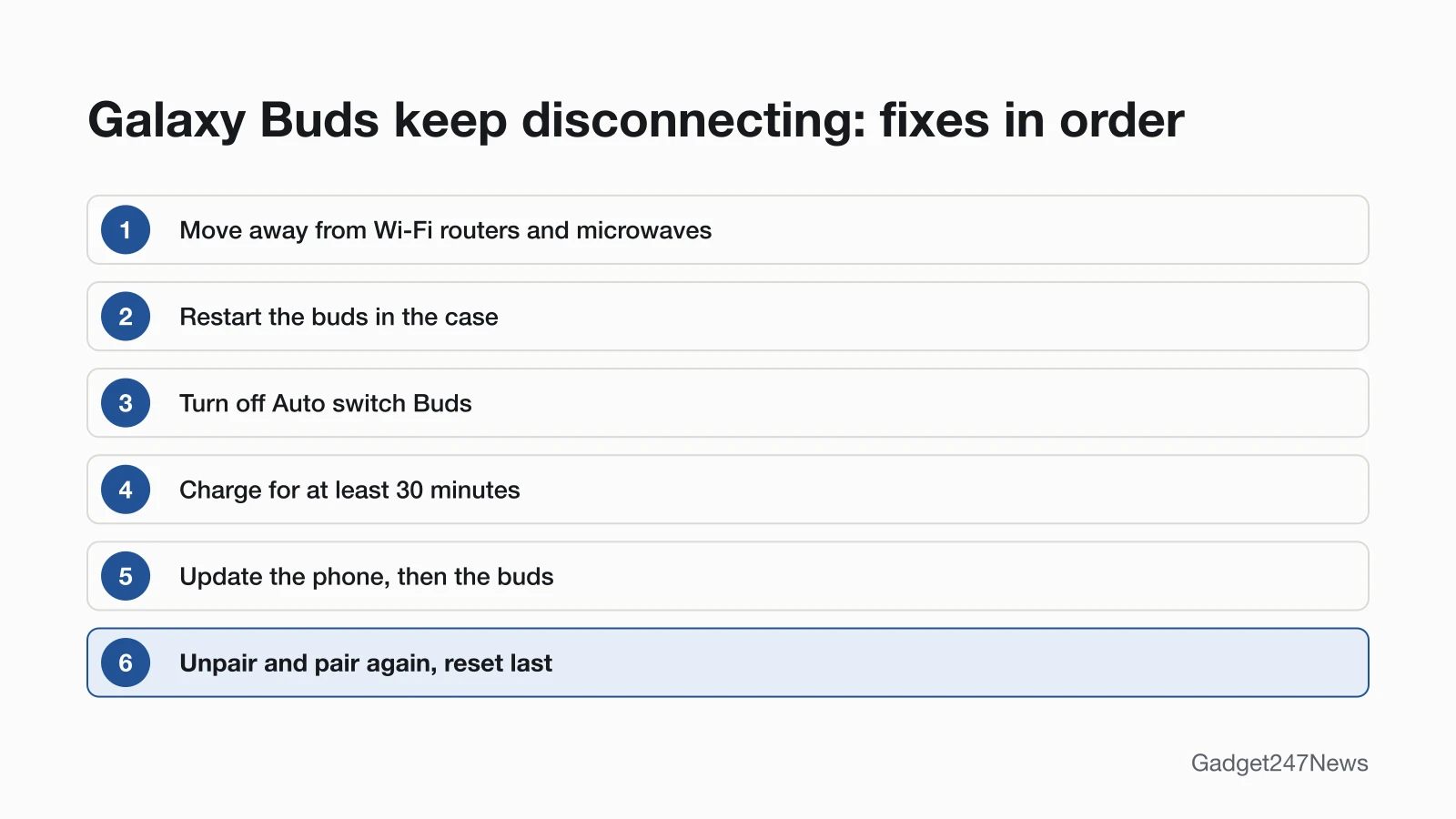
Six causes of Galaxy Buds dropouts come up across Samsung's support pages. Check them in this order:
- Interference: Wi-Fi routers or running microwaves nearby, or no clear path for the signal.
- Buds that need a restart: Samsung's second step for earbuds that won't stay connected is a restart in the case.
- Auto switch: the buds move to another Galaxy phone, tablet or Samsung TV signed in to the same Samsung account.
- Sleep Mode: buds left unused after you take them out of your ears "will enter Sleep Mode" and disconnect.
- Low battery: charging is Samsung's third step, and its audio guide says "Low battery life can lead to a decreased audio quality."
- Old software or a stale pairing: Samsung's page closes with unpairing and software updates, followed by a service request.
One disconnect is expected: during a software update, Samsung says your Galaxy Buds "will disconnect from your phone" and reconnect automatically once it's complete.
How to Fix Galaxy Buds That Keep Disconnecting
Fixes 1, 2 and 5 to 7 follow Samsung's page for earbuds that "don't connect or won't stay connected"; Fixes 3 and 4 cover two features that end a connection on purpose. Samsung's page unpairs before it updates and gives no factory reset, so the reset comes last here.
Fix 1: Move Away From Interference
Move the buds and your phone away from Wi-Fi routers and running microwaves: Samsung asks for "an uninterrupted path for the signal between earbuds and the connected device." Samsung's audio troubleshooting page adds a range: use the earbuds and your device within 30 feet of each other, away from walls and electrical equipment. The distance may vary with the environment and the earbud model.
Fix 2: Restart the Buds in the Case
Restart the buds before you change any setting:
- Put both buds back in the charging case and close the lid.
- Wait for the light on the case to go out, about 7 seconds.
- Take the buds out and connect them again.
If the case light flashes red or orange instead, charge the buds and the case first (Fix 5).
Fix 3: Turn Off Auto Switch (Galaxy Devices)
Auto switch moves your Galaxy Buds to the Galaxy device you're using. Samsung says the buds "will begin playing the YouTube video's audio" when you open a YouTube video on your tablet while music plays on your phone. Samsung's US page says it needs One UI 3.1 or above and the same Samsung account on every device. That page names Buds+, Buds Pro, Buds2, Buds2 Pro, Buds3 and Buds3 Pro, and Samsung's UK comparison adds Buds4 and Buds4 Pro. To stop it on a Galaxy phone:
- Open Settings and tap Connected devices.
- Tap Auto switch Buds, the feature that "Automatically connects your earbuds to the active device."
- Switch it off. Samsung's Buds4 business guide has you turn on "Auto switch" in the Galaxy Wearable app, so switch it off there if the app shows it.
Auto switch isn't multipoint: Samsung's US connection guide says "The earbuds cannot be connected to multiple devices simultaneously." What is Bluetooth multipoint explains how other earbuds handle two devices.
Fix 4: Keep Them in Use, or Expect Sleep Mode
Sleep Mode is a designed disconnect. Samsung says that if the buds "are not used for a predefined length of time after being removed from your ears," they enter Sleep Mode and disconnect from the phone. Samsung's page doesn't give the length of that timer. To reconnect on a Samsung phone, put the buds in the case and open the lid. Samsung says they "will automatically attempt to connect to your mobile device whenever you open the lid of the charging case."
Fix 5: Charge Them for at Least 30 Minutes
Charge the buds and the case together:
- Place both buds in the charging case, close the lid, and check that the charging contacts are clean and free of debris.
- Connect the USB cable to the port on the back of the case and to a Samsung-approved charger adapter plugged directly into a power outlet, then charge for at least 30 minutes.
Avoid a computer's USB port: Samsung says charging from a computer "can cause the earbuds to charge slower."
Fix 6: Update the Phone and the Buds
Update both ends of the connection:
- Restart the phone, tablet, TV or computer the buds connect to.
- Check that device for a software update and install it.
- Update the buds. On One UI 8, open Settings, tap your Galaxy Buds, then Earbuds software update → Download and install; on One UI 7.0 or earlier, use the same option in the Galaxy Wearable app.
Samsung asks for both earbuds charged and connected before you start. If the update runs into trouble, Samsung's fix is to restart the buds by closing them in the case for 10 seconds. Other routes are in the guide to update Samsung Galaxy Buds firmware.
Fix 7: Unpair the Buds and Pair Them Again
Remove the buds from the phone's Bluetooth list, then pair them again:
- On the phone, open Settings, tap Connections, then Bluetooth.
- Tap the gear icon next to your Galaxy Buds, tap Unpair, and confirm.
- Pair again: open the case next to a One UI 8 Galaxy phone and tap Connect on the pop-up, or add the buds in the Galaxy Wearable app on other Android phones.
Unpairing from Bluetooth also removes the buds from Galaxy Wearable if they were connected to it, Samsung notes. Before unpairing, Samsung's page re-syncs the buds by holding both touchpads for seven seconds or more while they're in the case.
Fix 8 (Last): Reset Your Galaxy Buds
A factory reset returns the buds "to their default settings," and Samsung's UK guide says it "can help resolve connection or performance issues." With both buds at 15% or more, tap Reset under Manage connections in your phone's Galaxy Buds settings (One UI 8) or the Wearable app, then pair them again. Each step is in reset Samsung Galaxy Buds.
Galaxy Buds Disconnecting From a Laptop or Android Phone
Windows laptops and non-Samsung Android phones add causes of their own.
Disconnecting From a Windows Laptop
Galaxy Buds pair with a Windows laptop through Settings → Bluetooth & devices → Add device → Bluetooth. Microsoft says drops that need constant re-pairing are "often caused by power-saving settings, outdated drivers, or temporary system glitches." Its fixes include unchecking Allow the computer to turn off this device to save power in Device Manager, restarting the Bluetooth Support Service and updating the Bluetooth driver. To pair from scratch, see Galaxy Buds on a Windows laptop.
Disconnecting From a Non-Samsung Android Phone
Auto switch and One UI 8 pop-up pairing work only on Samsung devices. Other Android phones run Galaxy Buds through the Galaxy Wearable app from Google Play, which Samsung's Buds3 Pro product page says needs Android 11.0 or above and at least 1.5 GB of memory. Samsung lists updating the Galaxy Wearable app among the steps that "will normally fix the issue." If the drops continue, pair Galaxy Buds with an Android phone again from the app.
Still not working?
Work down this list if every fix above failed:
- Try the next fix: Samsung Galaxy Buds not connecting to your phone (if they won't connect at all).
- Reset your Samsung Galaxy Buds: reset Samsung Galaxy Buds (you'll need to pair them again afterwards).
- Contact Samsung Support: Samsung Support (external).
- Check repair or warranty options: Samsung repair service (external).
Started after an update? Check the Update Tracker for known issues.
Related Problems
These Galaxy Buds faults can pass for dropouts:
- Buds that won't connect at all: a pairing fault, covered by step 1 of the list above.
- One bud that sounds quieter than the other: Samsung's audio guide re-couples them by closing both in the case for at least seven seconds (see one Galaxy Bud not working).
- Low sound while the connection holds: Samsung's audio guide has you check the volume limiter, range, battery and speakers.
Cutting Out Since an Update?
If your Galaxy Buds started cutting out suddenly after a software update, update both the phone and the earbud software, as Samsung's connection page lists. Then check your Samsung Galaxy Buds or Watch firmware for known issues. After a replacement bud, Samsung's UK guide warns that buds on different software versions may not enter connection mode until updated.
Galaxy Buds Disconnecting: Quick Answers
How do I unpair Galaxy Buds?
Unpair Galaxy Buds in the phone's Bluetooth settings: Settings → Connections → Bluetooth, the gear icon next to the buds, then Unpair. On One UI 8, Samsung's US guide shows Unpair at the bottom of that screen, beside Rename and Disconnect.
Can I unpair Galaxy Buds without my phone?
Only partly: closing the buds in the case ends the connection, and Samsung's US guide says this "will cause the earbuds to unpair from the connected device." Deleting them from the phone's list still takes the phone, and Galaxy Buds have no reset button. To move them to a new device, use pairing mode: Samsung says "a reset is not required."
Why do my Galaxy Buds keep cutting out?
Interference is Samsung's first suspect: Wi-Fi routers, running microwaves, or walls and electrical equipment between the buds and the phone, or more distance than the 30 feet its audio page gives. Then restart the buds in the case, charge them for at least 30 minutes, and update the phone and the buds.
Sources
We checked this page against the pages below, most recently on . How we verify fixes
- Samsung earbuds don't connect or won't stay connected (Samsung, samsung.com)Official
- Audio issues on Galaxy Buds when playing music (Samsung, samsung.com)Official
- Use Auto switch with your Galaxy buds and paired devices (Samsung, samsung.com)Official
- How to connect Galaxy device using Connected Devices? (Samsung Gulf) (Samsung, samsung.com)Official
- How to pair and switch Galaxy Buds4 earbuds on your Samsung mobile device (Samsung Business Insights) (Samsung, insights.samsung.com)Official
- Galaxy Buds4 Pro and Buds4 vs Galaxy Buds3 Pro and Buds3 (Samsung UK) (Samsung, samsung.com)Official
- How to connect your Samsung Galaxy earbuds (Samsung, samsung.com)Official
- How to connect or disconnect Galaxy Buds to a mobile? (Samsung Singapore) (Samsung, samsung.com)Official
- How to update your Samsung Galaxy Buds software (Samsung UK) (Samsung, samsung.com)Official
- How to install software updates on your Samsung earbuds (Samsung, samsung.com)Official
- Static noise coming from a Samsung earbud (Samsung, samsung.com)Official
- What to do when sound is not heard from one side of your Samsung Galaxy Buds series (Samsung UK) (Samsung, samsung.com)Official
- How to restart or reset your Samsung earbuds (Samsung, samsung.com)Official
- How to reset your Samsung Galaxy Buds (Samsung UK) (Samsung, samsung.com)Official
- How to pair Galaxy Buds using Bluetooth in Samsung One UI 8 (Samsung Australia) (Samsung, samsung.com)Official
- How to adjust your Galaxy Buds settings on One UI 8 (Samsung, samsung.com)Official
- How to connect Samsung Galaxy Buds series to a laptop to listen to music (Samsung UK) (Samsung, samsung.com)Official
- Bluetooth keeps disconnecting in Windows (Microsoft Support) (Microsoft, support.microsoft.com)Official
- Galaxy Buds3 Pro product page, footnotes (Samsung Gulf) (Samsung, samsung.com)Official