How to Set Up Cellular on Apple Watch

By Suraj Giri, Founder & Publisher. Reviewed by Suraj Giri on .
Published · 4 min read
How this page was made
- Sources. Checked against 2 official pages from Apple, most recently on . See the sources.
- No device testing. We don't test fixes on physical devices, so nothing on this page is a hands-on result. A fact counts as verified only when it matches an official source page.
- AI use. As with every page on Gadget247News, AI tools helped research, outline, draft and edit this page, and re-read the official pages to flag facts that didn't match. The illustration at the top was generated with Runway and is labelled under the image.
- Human sign-off. Suraj Giri, Founder & Publisher, read this page and signed it off on . The site won't publish a page without that sign-off.
- Changes. The published and updated dates move only when the content changes, and every change gets a dated note. Spot an error or a fix that didn't work? Email info@gadget247news.com.
Read our AI use policy, editorial policy and corrections policy.
Open the Apple Watch app on your iPhone, tap My Watch, tap Cellular, then tap Set Up Cellular. A cellular plan lets the watch make calls, reply to messages and receive notifications even when it isn't connected to your iPhone or Wi-Fi. Not every Apple Watch has cellular. This guide sits with the other watch setup guides, such as how to change the Apple Watch face.
If the watch is no longer paired with your iPhone, re-pair an Apple Watch and look for the cellular option during setup.
How to Set Up Cellular on Apple Watch
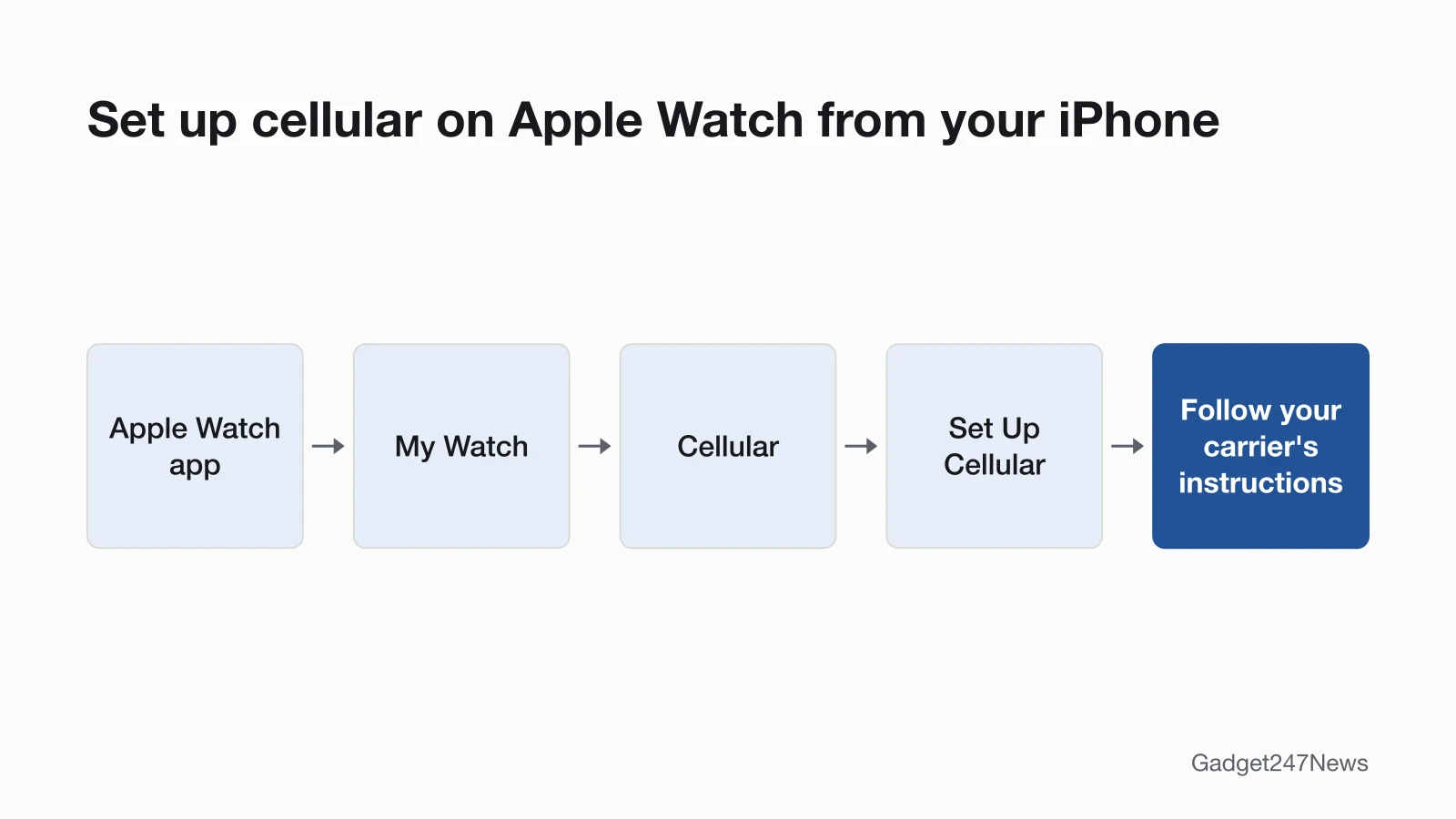
To set up cellular on Apple Watch, use the option during first setup or add it later. During setup, look for the option to set up cellular, then follow the onscreen steps. To add cellular after setup:
- On your iPhone, open the Apple Watch app.
- Tap the My Watch tab, then tap Cellular.
- Tap Set Up Cellular.
- Follow the instructions for your carrier. Contact your carrier if you need help.
The app may show a different phone number for the watch. Apple says it's "for your carrier's billing or tracking purposes only", and your iPhone and Apple Watch share the same number.
Turn Cellular On or Off and Read the Cellular Button
To turn cellular on or off, press the side button to open Control Center, tap the Cellular button, then tap Cellular on the screen that appears. The button's color shows which connection the watch is using:
| Cellular button | What it means |
|---|---|
| Green | The watch has a cellular connection. The green bars show the signal strength. |
| White | Your cellular plan is active, but the watch is connected to your iPhone over Bluetooth or Wi-Fi. |
The watch picks its connection on its own: your iPhone when it's nearby, a Wi-Fi network you've joined before on your iPhone, or a cellular network. Apple notes that turning on cellular for extended periods uses more battery power.
Which Networks Your Apple Watch Uses
The networks your Apple Watch can use depend on the model:
| Models | Networks |
|---|---|
| Cellular models introduced in 2024 and earlier | 4G LTE and 3G (UMTS) |
| Series 11 and later, SE 3, Ultra 3 and later | 4G LTE and 5G, where available |
5G connectivity requires a cellular plan with a participating carrier. Cellular models also come in regional versions for the Americas, China mainland and Europe/Asia Pacific, because unlike iPhone, there isn't a worldwide Apple Watch model that supports all cellular bands.
Use Cellular When You Travel (Roaming)
To use cellular abroad, three things have to line up:
- Watch and software: watchOS 9.1 or later on a cellular Apple Watch Series 5 or later, SE or later, or Ultra or later.
- Carrier: your iPhone carrier adds the watch to your iPhone cellular roaming plan, and it must support VoLTE and roaming.
- Setting: on the watch, open the Settings app, tap Cellular, then turn on Data Roaming.
International roaming isn't supported on cellular watches set up using Apple Watch For Your Kids.
Move or Remove a Cellular Plan
To remove a cellular plan from your Apple Watch:
- On your iPhone, open the Apple Watch app.
- Tap the My Watch tab, then tap Cellular.
- Tap the information button next to your plan, tap Remove [carrier] Plan, then tap again to confirm.
For a new watch, remove the plan from the old one, pair the new watch, then tap Set up Cellular during setup. Some carriers let you transfer the plan directly from the Apple Watch app. If you changed carriers on your iPhone, remove the old plan and sign up for a new one; carrier fees may apply.
How to Check It Worked
Away from your iPhone, open Control Center: a green Cellular button with signal bars means the watch is on a cellular network. Tap it, then tap Cellular to see your Plan and Status.
If Apple Watch Cellular Isn't Working
When Apple Watch cellular isn't working, try these fixes in order:
- Read the button first. A white Cellular button with your iPhone nearby is expected: the plan is active and the watch is using your iPhone.
- Check Plan and Status. Tap the Cellular button in Control Center, then tap Cellular. If Plan or Status is missing, contact your carrier.
- Cycle Airplane Mode. Turn on Airplane Mode on your iPhone and your Apple Watch, wait 15 seconds, then turn it off on both.
- Close the Apple Watch app on your iPhone, then try again.
- Restart your iPhone and your Apple Watch, then try again.
If these steps don't work, contact your carrier. Some apps might not update without a connection to your iPhone, even with cellular on. If the watch won't connect to your iPhone at all, the problem is the connection, not the plan: see Apple Watch disconnected after an update.
Related Setup Tasks
Two more setup guides:
- Apple Pay on the watch, in the Apple Pay setup guide.
- For Garmin watch owners: Garmin Body Battery explained, on the energy score Garmin shows.
Cellular Questions
Short answers on the watch's number, cellular without your iPhone, and carriers.
Why does my Apple Watch have a different phone number?
The number shown for your Apple Watch is for your carrier's billing or tracking purposes only, according to Apple. Your iPhone and Apple Watch share the same number.
Does Apple Watch cellular work without my iPhone?
Yes. Apple says a watch with a cellular plan can stay connected even when away from your iPhone. On cellular, the Cellular button turns green; if it doesn't, work through the fixes above.
Can my Apple Watch use a different carrier than my iPhone?
No. Your iPhone and Apple Watch must use the same carrier, unless the watch was set up using Apple Watch For Your Kids, formerly known as Family Setup.
Sources
We checked this page against the pages below, most recently on . How we verify fixes
- Set up cellular on Apple Watch (Apple, support.apple.com)Official
- Set up and use cellular service on Apple Watch (Apple Watch User Guide) (Apple, support.apple.com)Official